I have my fingers in many pies: IT/techie/charity/non profit/nptech/mission stuff. Founded 2004
Many Pies
Monday, February 27, 2012
Feel the CPU power
Whilst it's not too hard to gather stats on the performance of older computing devices, in this blog post you won't find any numbers to do with clock rates, or storage sizes. I'm talking about how performance feels.
Mumble-mumble years ago I worked on minicomputers. They were about the size of a two drawer filing cabinet. To anyone under 40 it must sound strange to call such a beast a "mini" computer. However in those days non-mini computers were as big as chest freezers or bigger. PCs were around, but weren't very powerful. They had just grown out of being hobby computers and appearing in offices. However the computer systems we worked on needed proper powerful computers.
Then one day I came across "Linux" on an internal mailing list. Someone had installed a Unix variation on a PC. For me Unix was the OS on the PDP-11 I used at University. I had no idea what it looked like, and in my mental pictures of it it still used tape for main storage. I used Unix on an NCR computer at my year out job at York Health Authority - it had 16 terminal ports and we didn't stretch it too much, apart from the odd complicated SQL query.
My experience of using a PC for "proper" computing stuff was trying to get it to work as an X-windows terminal. It was incredibly slow and I spent more time that I wanted to really trying to get it to not double refresh windows.
So the idea of running a grown up OS like Unix on a little PC was very strange. Time passed and a few years later Linux came to be the thing you ran on older PC hardware as it had better performance than Windows. In that time too Windows started to get grown-up with Windows NT which ran well on a dual P-90 workstation.
Time continued passing and one of my sons got an Android phone and there, as it started up, at the top of the screen were the familiar messages of a Unix-like OS starting up...
This is the first post I'm tagging nostalgia, though I need to tag at least one or two others.
Labels:
nostalgia
Wednesday, January 25, 2012
Secondary attention
Our old TV died the other week, giving us psychedelic colour effects as it did so. Now we've got a new one with a VGA input. So I've been thinking about what sort of secondary attention thing I can do with it.
The other day I found a video on YouTube of a fire. I put it on 20 minutes or so before there was a TV programme we all wanted to watch. After it ran for a few seconds the boys asked me to find something else. I said no, the whole point is that your fire doesn't change, it just keeps burning.
I'm thinking of something that's equally boring, but in time, or over a period of time, does something interesting. So when the TV's not showing a programme it sits there in the corner and is worth glancing at. So not a programme, but a program.
The other day I found a video on YouTube of a fire. I put it on 20 minutes or so before there was a TV programme we all wanted to watch. After it ran for a few seconds the boys asked me to find something else. I said no, the whole point is that your fire doesn't change, it just keeps burning.
I'm thinking of something that's equally boring, but in time, or over a period of time, does something interesting. So when the TV's not showing a programme it sits there in the corner and is worth glancing at. So not a programme, but a program.
Labels:
play
Wednesday, January 11, 2012
The BBC Micro and me
A couple of weeks ago Charles Arthur, the technology correspondent for The Guardian asked on twitter
So who is there out there whose experience with the BBC Micro led them to achieve something notable in the computing business?I responded as we had a BBC Micro at school which I used in the sixth form. I gave him some details, but he was looking for someone who, if it hadn't been for the BBC Micro, wouldn't have got into computers. I wanted to be a programmer from aged 11 and we had a Spectrum at home, so that didn't apply to me and he didn't use my story in the article that he wrote on it. I paid for my driving lessons with the money I made on games I wrote for the Spectrum (and probably the BBC) and sold to magazines.
In our correspondence he asked
And do you think that kids today have enough access to that sort of programming, or do they need a "new Micro" to inspire them?I replied:
Kids today have access to a wide range of free programming environments via the internet. If I were to start doing games today I'd be using a physics/gaming engine to do the heavy lifting, and aiming to get my stuff on miniclip or in an app store. Angry Birds is probably the thing that inspires them.
So I'm not sure any new type of hardware is needed. Today the BBC ran this story about a new curriculum for ICT.
Computer games entrepreneur Ian Livingstone, an adviser to Mr Gove, envisages a new curriculum that could have 16-year-olds creating their own apps for smartphones and 18-year-olds able to write their own simple programming language.So I guess they agree with me!
I also recently came across this petition on the UK Government petitions website "Teach our kids to code". I don't like the way it uses the word "coding" which is a bit of jargon which could be better expressed as "programming". It also seems a bit unnecessary now in the light of that BBC story.
Photo from Rain Rabbit.
Labels:
nostalgia,
programming
Friday, January 06, 2012
My public speaking engagements in 2012
I've read a couple of blog posts recently where people have outlined their public speaking engagements this year. Now I get to do it too!
Actually there's only one.
We're having the Wycliffe Conference at our church on 4th February 2012. I'm doing a session entitled "Tech Transforming Translation". What I'm planning to do is try and condense our Check IT Out day (which we're unfortunately not running this year) into 50 minutes.
So it's going to be a bit of a roller coaster ride. At the moment I'm planning to cover the following topics:
Actually there's only one.
We're having the Wycliffe Conference at our church on 4th February 2012. I'm doing a session entitled "Tech Transforming Translation". What I'm planning to do is try and condense our Check IT Out day (which we're unfortunately not running this year) into 50 minutes.
So it's going to be a bit of a roller coaster ride. At the moment I'm planning to cover the following topics:
- Using media (videos, CDs, websites, mobile phones, mp3 players) for distributing Bibles
- Translating sign languages
- Complex fonts
- IT support in harsh conditions (dust, heat, humidity, lightning, dodgy electricity supply)
- How you can use your IT skills to help missions, without leaving this country - MissionAssist (formerly Wycliffe Associates UK)
More details on our Wycliffe Conference page.
Labels:
IT Support,
sign language,
wycliffe
Wednesday, December 21, 2011
"Content" is a horrible word
I try and keep work/technical things on this blog, and other stuff on my other blog. However the boundaries are blurred, so you if you're only reading this one you might be interested in my post on my other blog - "Content" is a horrible word.
Labels:
web
Monday, December 05, 2011
raspberrypi - dirt cheap computing power
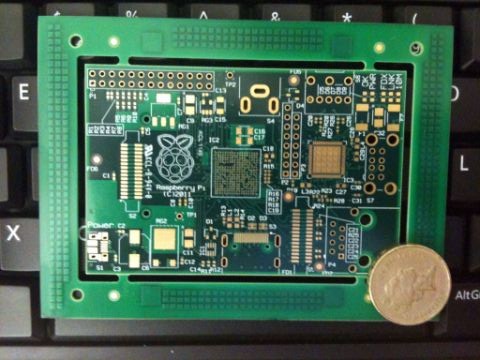
I've mentioned "hobby" type electronics before, and I've come across some really expensive kits, but I've recently come across something that is cheap and powerful. raspberrypi.org are making "an ARM GNU/Linux box for $25" ($35 if you want ethernet).
My last job before this was for a small electronics firm. I remember the days when we'd get a PCB back from the manufacturers and then a few days latter we'd get a populated board and be able to hook up to it and start writing software. Exciting times. I plan to buy one of these, but it looks like it won't quite be ready in time for Christmas, so it won't be going on my present list.
I already have in mind what I'm going to do with it - hook it up to the BBC weather site so when we turn the TV on in the morning we know whether to take a coat or not.
Labels:
play
Friday, November 25, 2011
Blackbaud NetCommunity redirect to previous page after login
After I put on the Blackbaud forums that I knew how to do this and the third person asked for details I thought I'd better tell you all.
The scenario to use this is if, say, you have a donation page and you want to offer the option of logging in. Once the user has logged in you want them to go back to the donation page, rather than the page they would normally go to after login.
First of all grab yourself the code from Stephen Morley to parse query strings (the bit after a ? in a URL). Create a document library on some sort of test page on your site and upload it.
Then create a formatted text and images part and put this in it:
Things to modify:
The scenario to use this is if, say, you have a donation page and you want to offer the option of logging in. Once the user has logged in you want them to go back to the donation page, rather than the page they would normally go to after login.
First of all grab yourself the code from Stephen Morley to parse query strings (the bit after a ? in a URL). Create a document library on some sort of test page on your site and upload it.
Then create a formatted text and images part and put this in it:
Things to modify:
- Your website domain
- Set the id of the login page in the loginPageId variable at the top.
- Put the id of that page in the loginHomePageId variable that you want them to go to when they log in through some other route (where you don't want them to go back to the previous page).
- Put the id of the document you uploaded instead of "10" in this bit /NetCommunity/Document.Doc?id=10
- Make sure that the function name runit3 is unique amongst all your javascript parts, otherwise change it.
Once you've done those modification you create a new page and put this part into it. Configure the login part to go to this new page after login.
You'll notice that I look for where the id of the previous page is 1. This is for a link we used to have at the top of every page on our site, but's no longer there. It had the srcid as 1 so we could track how many people clicked on that link in our analytics reports. I kept the code just in case.
Labels:
Blackbaud,
NetCommunity
Subscribe to:
Comments (Atom)